

Samsung One UI 8.5 Beta – A Complete In-Depth Exploration
Samsung continues to refine its software experience every year, and the arrival of it marks another strong step forward. While Samsung’s flagship devices are known for their hardware excellence, it is the software layer—the One UI interface—that truly elevates the daily user experience. The new beta update focuses on greater personalization, smoother animations, advanced AI features, improved privacy, and a more intuitive visual language.
Introduction: What Makes One UI 8.5 Beta Special?
Samsung’s One UI journey has evolved dramatically over the years. From a basic customization layer to a well-optimized ecosystem with deep personalization options, Samsung has consistently polished the experience.
The new Beta reflects Samsung’s push into AI-powered interfaces, smoother controls, deeper multitasking, and enhanced cross-device connectivity. It may still be in the beta stage, but the interface feels significantly more matured, polished, and capable than earlier versions.
Users joining the beta program have already reported noticeable boosts in responsiveness and several quality-of-life improvements that make everyday tasks more efficient. With the world shifting toward intelligent smartphone ecosystems, it positions Samsung ahead in the software race.
Refined and Modern UI Design
One UI 8.5 Beta introduces subtle yet meaningful visual upgrades that make the interface feel more modern and fluid.
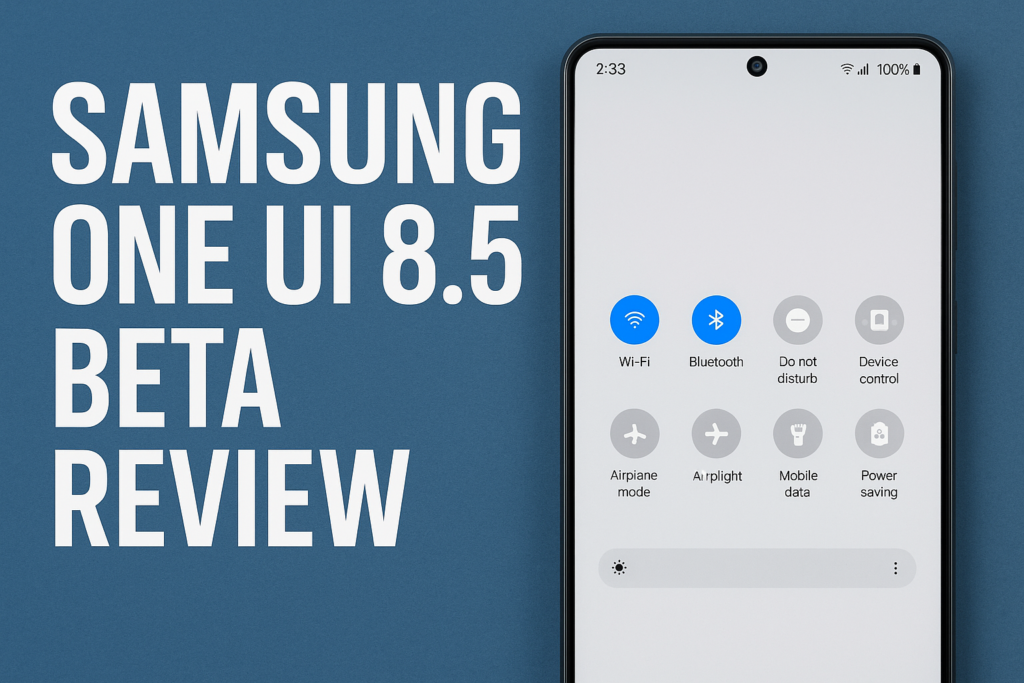
1. Simplified Quick Panel
The quick toggles receive a redesigned layout with better spacing, clearer icons, and a more minimalistic structure. This makes navigation easier, especially with one-hand use.
2. Enhanced Color Palette
Instead of the earlier theme engine relying solely on basic color extraction, it offers a more dynamic theme system that adjusts contrast, shadows, and subtle gradients. This brings a more cohesive look across the system.
3. Smoother Animations
Samsung has reworked transitions for app launches, notifications, multitasking views, and page swipes. The animations are faster, cleaner, and feel closer to a flagship desktop OS.
4. New Lock Screen Options
Additional clock styles, wallpaper effects, interactive widgets, and a refreshed Always-On Display layout give users better personalization control.
Performance Improvements and Optimization
Performance is one of the major highlights of One UI 8.5 Beta.
1. Faster App Load Times
Apps open almost instantly thanks to improved RAM allocation and background process management.
2. Battery Optimization
Samsung has modified CPU frequency behavior to reduce unnecessary peaks. This results in:
- Better standby time
- Reduced heating
- More efficient battery usage
3. Improved Multitasking
Switching between multiple apps feels smoother. The memory management system now keeps more apps active without slowing down the device.
4. Revamped System Resource Manager
The internal process scheduler has been optimized to detect active tasks and prioritize essential operations over background tasks.
AI-Powered Enhancements in One UI 8.5 Beta
Artificial Intelligence is at the core of it update. Samsung has integrated AI deeply into the user interface to offer more personalized, efficient, and intuitive experiences.
1. Smart Suggestions 2.0
The suggestions panel becomes smarter:
- Predicts the next app you may open
- Recommends actions based on time of day
- Helps automate repetitive tasks
2. AI-Optimized Battery Modes
Instead of manually selecting battery profiles, the AI analyzes your usage pattern and automatically adjusts background processes.
3. AI-Camera Enhancements
Photography gets a major uplift with:
- Enhanced low-light processing
- Smarter scene recognition
- Stabilized video performance
4. AI-Powered Text Extraction
The gallery app now extracts text from images more accurately. Even handwritten notes are processed with higher precision.
Upgraded Security and Privacy Controls
Samsung continues to build a secure mobile ecosystem, and One UI 8.5 Beta strengthens privacy further.
1. Improved Permission Manager
The interface clearly displays apps accessing sensitive features like:
- Microphone
- Camera
- Location
- Contacts
2. Separate Secure Work Mode
A dedicated mode for work profiles allows users to isolate business data from personal files.
3. New Privacy Dashboard
A simplified privacy dashboard centralizes all controls with real-time data about background usage and potential access vulnerabilities.
4. Auto-Blocked Spam Protection
AI detects harmful links, scam messages, and malicious content instantly, offering stronger communication security.
Camera & Editing Upgrades
The camera interface also receives a gentle redesign, making settings more accessible without overwhelming the user.
1. Enhanced Pro Controls
The manual mode now reacts more fluidly, with better histograms, improved shutter tuning, and enhanced image previews.
2. New Editing Tools
A redesigned editing suite offers:
- Smart object removal
- AI-powered portrait retouching
- Intelligent filters
- One-tap enhancement
3. More Consistent Colors
Photos appear more natural, with reduced oversharpening and better dynamic range processing.
Multitasking and Productivity Boosts
Power users will appreciate the new multitasking improvements in it.
1. Enhanced Split-Screen Mode
You can save custom layouts for different tasks. For example:
- Social media + browser
- Video player + messaging
2. Better Taskbar Experience
Large-screen devices like Fold models get a refined taskbar:
- Faster app switching
- Larger icons
- More intuitive gestures
3. Improved Samsung Notes
New text recognition, drawing tools, and auto-sync features make note-taking smoother.
4. Updated DeX Experience
Samsung DeX receives:
- Lower latency
- Better window controls
- Improved desktop-like responsiveness
Connectivity & Ecosystem Upgrades
Samsung continues to expand its ecosystem, and One UI 8.5 Beta makes cross-device integration more seamless.
1. Smart Switch Improvements
Data transfer between devices is faster and more stable.
2. Galaxy Watch Integration
Wearables get deeper connectivity options, including universal clipboard and synced modes.
3. Multi-Device Experience
Users can share files instantly between phones, tablets, and laptops with enhanced speed and reliability.
4. Audio Enhancement
The audio share feature now supports more devices with reduced latency for Bluetooth headsets.
Supported Devices for One UI 8.5 Beta
The beta update typically arrives first on flagship devices. Although the list varies by region, the following categories are expected to be included:
- Galaxy S-series (recent models)
- Galaxy Z Fold and Z Flip series
- Premium A-series (selected models)
- Galaxy Tab S-series
Samsung usually expands the coverage gradually based on feedback and stability.
Known Issues in the Beta Version
As with any beta software, it includes some bugs. Common issues reported include:
- Occasional animation glitches
- App compatibility problems
- Some heating during prolonged gaming
- Minor camera inconsistencies in low-light
- Random UI freezes (rare but present)
These will be polished in future beta patches and the final stable release.

How the Update Enhances User Experience
Beyond new features, the biggest win with One UI 8.5 Beta is the consistency and fluidity it brings. Users will notice:
- Cleaner layout
- Faster controls
- More logical settings arrangement
- Better battery backup
- Higher camera quality
The update improves almost every aspect of daily smartphone usage.
Expected Timeline for Stable Release
Samsung typically rolls out stable versions shortly after beta testing concludes. Once user feedback is implemented, the stable update will reach flagship devices first, followed by mid-range models.
Conclusion – One UI 8.5 Beta Shows Samsung’s Future Vision
It demonstrates Samsung’s vision for a smarter, more intuitive smartphone ecosystem. The addition of AI-driven improvements, performance boosts, refined visuals, productivity tools, and enhanced security makes it one of the most significant beta updates in the One UI series.