

What is Nothing OS 4.0?
It is the latest major software update from Nothing, built on Android 16. It brings a refined user interface, improved performance, and a host of new features — aimed at making Nothing smartphones more responsive, personalizable, and modern.

What’s New: Features & Improvements
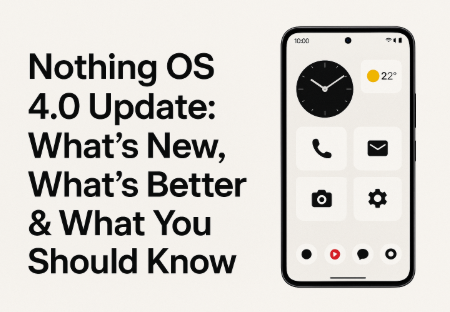
• Fresh, cleaner design and UI polish
- The update refreshes first-party app icons, status bar icons (Wi-Fi, battery, data), and introduces two new lock-screen clock faces.
- Animations and system gestures have been improved — opening/closing apps, swipes, notifications feel smoother, more fluid and responsive.
- Quick Settings tiles can now be resized (e.g. wider 2×2 layout), and widgets (weather, pedometer, screen-time, etc.) get new size options.
• Better multitasking & productivity tools
- A new “Pop-up View” mode allows running two apps as floating windows simultaneously — helpful if you want to browse while chatting, navigate while playing music, etc.
- The OS also offers a refined app-optimisation system: apps launch faster, background performance is optimized, and multitasking becomes more stable.
• Dark Mode, better display & interface customisation
- “Extra Dark Mode” gives much deeper blacks, better contrast, and reduces eye-strain — especially in low-light conditions. This applies to system UI and some default apps.
- Improved control over brightness, always-on display, and other display settings.
• AI, smart features & customisation with Nothing’s ecosystem
- For devices like Nothing Phone (3), it includes an AI Usage Dashboard in “Essential Space,” helping users understand how on-device AI models are being used.
- Through the new “Essential Apps” + “Nothing Playground,” users can create custom AI-powered widgets by describing what they want — no coding required. Great for those who love personalization. Connectivity improvements: more stable Wi-Fi, better Bluetooth performance, refined camera and network stability.
• Enhanced Camera & Media Tools
- The update brings new camera presets (like a special “Stretch” preset developed with a professional photographer), improved Gallery interface and better photo/video processing. For compatible devices: upgrades under the hood to power these changes, improving the overall creative potential for users.
Who Gets It (Which Phones) & Rollout Info
The rollout of Nothing OS 4.0 has begun with Phone (3) and will gradually expand to other Nothing and CMF-series smartphones.
Some features — especially AI-dashboard, AI widgets, and advanced “Glyph” integration — are exclusive to higher-end devices (like Phone 3).
Pros (Benefits) 👍(Tech Arabinda)
- Significantly smoother, faster, more fluid user experience — animations, gestures, app launches feel much better.
- Better multitasking with floating windows — useful for multitaskers, heavy users.
- Cleaner, minimalistic UI design + deeper dark mode offers aesthetic appeal + battery savings (on OLED).
- Powerful customisation: AI widgets, adjustable widgets/tiles, camera presets — good for those who like to tweak their phone.
- Improved stability — Wi-Fi, Bluetooth, camera, and performance optimizations enhance reliability.
Cons (Possible Downsides / Limitations) ⚠️
- Some advanced features (AI dashboard, widget builder, Glyph extras) are limited to certain models, so lower-end Nothing phones may not benefit fully.
- As with any major update, there’s a chance some bugs or instability — especially during early rollout / beta stages.
- If you heavily rely on features from older OS versions or custom setups, things might need re-adjustment (settings, widgets etc.).
- Users not comfortable with big UI changes might prefer more conservative UI/stability rather than freshly redesigned interface.
Final Thoughts
Nothing OS 4.0 is a bold, modern step forward for Nothing — a well-rounded update that blends performance, design, AI-powered customization and practicality. If you own a compatible device, it’s worth upgrading to enjoy the smoother interface, better multitasking and creative tools. However, those using older or budget models should check whether key features are available on their device.
🔧 How to Install Nothing OS 4.0 (Step-by-Step Guide)
If your device is eligible, here’s how you can install the update:
Step 1: Go to Settings
Step 2: Scroll to System → System Update
Step 3: Check for its Update
Step 4: Tap Download & Install
Step 5: Wait for the system to reboot
After reboot, your phone will start with the new OS and redesigned interface.
Tip: Make sure battery is above 30% before updating.
📱 Eligible Devices for Nothing OS 4.0
(You can adjust based on official info.)
- Nothing Phone (3)
- Nothing Phone (2)
- Nothing Phone (2a)
- CMF Phone series (selected models)
- Future Nothing devices (as rollout expands)
🌐 Nothing OS 4.0 vs Nothing OS 3.5 (Quick Comparison)
| Feature | Nothing OS 3.5 | Nothing OS 4.0 |
|---|---|---|
| UI Design | Minimal but basic | More polished, new icons, better animations |
| Dark Mode | Standard | Extra Deep Dark Mode |
| Multitasking | Standard split-screen | New Floating Pop-up View |
| Widgets | Basic sizes | Customisable widget sizes |
| Speed & Performance | Good | Faster app launch, smoother gestures |
| AI Features | Limited | AI dashboards, AI widget builder |
| Camera UI | Old | New presets & improved gallery |
🎯 Who Should Update to it?
✔ Ideal for:
- Power users who love advanced features
- People who want full customisation
- Gamers (because of smoother performance)
- Creators (improved camera tools)
- Minimal UI lovers
✖ Not ideal for:
- Users who prefer a stable OS with zero changes
- People using older Nothing devices with limited feature support
💬 User Experience & Community Feedback
(You can add user opinions after using the update.)
Many users have reported:
- Better animation smoothness
- Faster app switching
- More stable Wi-Fi and network performance
- Cleaner UI feels “premium”
However, some early users found:
- Occasional heating during first hours after update
- Some apps needing re-optimisation
🧭 Should You Upgrade? (Conclusion)
If you want a modern UI, smoother gestures, AI tools, better dark mode, and improved multitasking — Nothing OS 4.0 is definitely worth it.
For older devices, wait a few days until the stable version rolls out and early bugs are fixed.
If you want to know more topics related to it and other like smartphones, or any tech related information then please like and comment me and you can follow my site.