


Introduction
If you’ve ever used ChatGPT and felt that the answers were too short, too generic, or simply not what you expected, you’re not alone. The quality of ChatGPT’s response depends on one important thing- the prompt.
A prompt is simply the instruction you give to ChatGPT. The more specific and detailed your prompt is, the better the results will be.
Instead of asking a simple question, you can guide ChatGPT like a personal assistant and receive detailed, creative, and highly useful answers.
Whether you’re a student, content creator, business owner, programmer, or someone who just wants to save time, learning a few powerful ChatGPT prompts can completely change the way you use AI.
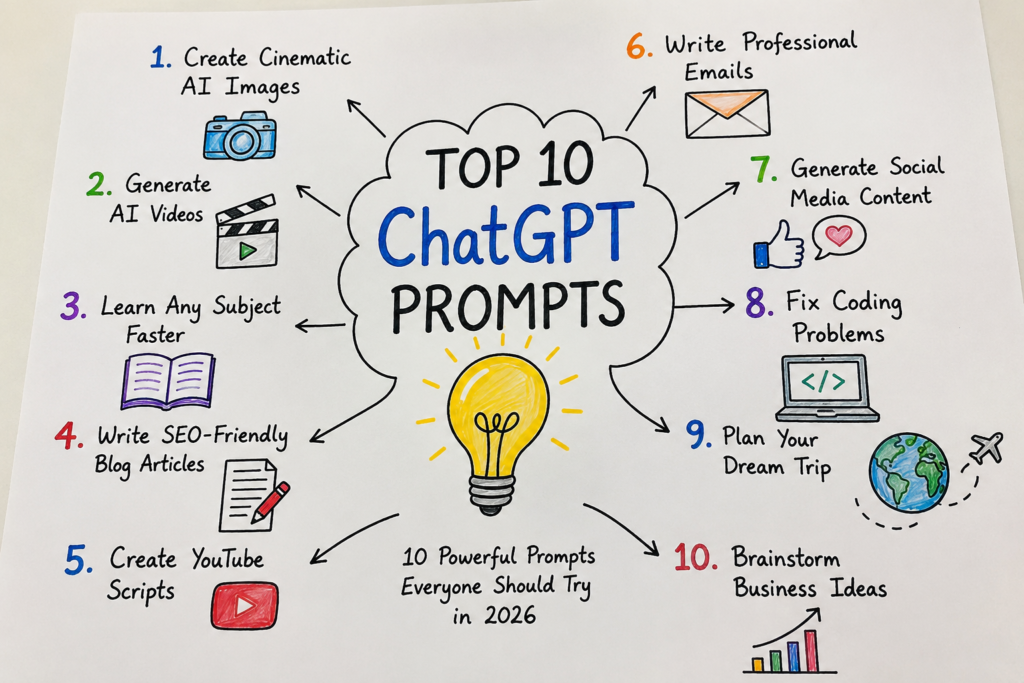
In this article, you’ll discover 10 practical ChatGPT prompts that you can copy, paste, and use immediately.
These prompts are designed for real-life tasks such as creating AI images, writing blogs, making videos, studying faster, and much more.
1. Create Cinematic AI Images
Have you ever wanted to create images that look like movie posters or high-end photography? ChatGPT can help you write amazing prompts for AI image generators.
This is perfect for YouTube thumbnails, wallpapers, social media posts, posters, and digital art.
Best For
- YouTubers
- Bloggers
- Graphic designers
- Social media creators
- AI art lovers
Copy & Paste Prompt
Create an ultra-realistic cinematic image of a futuristic city at sunset. A confident young man wearing a black leather jacket stands on a rooftop overlooking neon lights and flying cars. Dramatic golden-hour lighting, volumetric fog, realistic reflections, depth of field, highly detailed, vibrant colors, 8K quality, movie poster style.
What You’ll Get
- Stunning AI artwork
- Professional-looking wallpapers
- Thumbnail-ready images
- Social media graphics
Prompt Flow
Idea
↓
Choose the Subject
↓
Describe the Background
↓
Add Lighting & Camera Style
↓
Mention Image Quality
↓
Generate an Amazing AI Image
Pro Tip
Always include details like lighting, camera angle, background, colors, quality, and art style. These small details make a huge difference in the final image.
2. Create Amazing AI Videos
AI video tools are becoming more powerful every year. Instead of typing a simple sentence, give the AI a complete scene with camera movements, lighting, and mood.
Best For
- YouTube creators
- Instagram Reels
- Short films
- Advertisements
- AI filmmaking
Copy & Paste Prompt
Create a 10-second cinematic video of a majestic lion walking through a rainy cyberpunk city at night. The camera slowly follows the lion from the front while neon lights reflect on the wet streets. Add dramatic lighting, slow-motion effects, realistic rain, fog, and 4K cinematic quality.
What You’ll Get
- High-quality AI videos
- Realistic camera movement
- Better storytelling
- Professional cinematic scenes
Prompt Flow
Choose Your Character
↓
Describe the Scene
↓
Add Camera Movement
↓
Add Lighting & Effects
↓
Choose Video Quality
↓
Generate the Video
Pro Tip
Don’t forget to mention:
- Camera movement
- Lighting
- Weather
- Duration
- Resolution
- Mood
These details help create much better AI videos.
3. Learn Any Subject Like a Personal Teacher
One of the best uses of ChatGPT is learning. Instead of searching through multiple websites, you can ask ChatGPT to explain any topic in simple language.
This prompt is especially useful for students preparing for exams.
Best For
- School students
- College students
- Competitive exam preparation
- Self-learning
- Teachers
Copy & Paste Prompt
Explain the topic “[Your Topic]” as if you’re teaching a beginner. Use very simple English, real-life examples, step-by-step explanations, important points, memory tricks, and finish with 10 practice questions and answers.
Example
Replace [Your Topic] with:
- Newton’s Laws of Motion
- Photosynthesis
- Artificial Intelligence
- Python Programming
- World War II
- Solar System
What You’ll Get
- Easy explanations
- Real-life examples
- Quick revision notes
- Practice questions
- Better understanding
Learning Flow
Choose Your Topic
↓
Ask for Beginner-Friendly Explanation
↓
Read Real-Life Examples
↓
Practice Questions
↓
Revise & Learn Faster
Pro Tip
At the end of your prompt, add this sentence:
“Explain everything like I’m a complete beginner.”
4. Write SEO-Friendly Blog Articles in Minutes
Writing a blog from scratch can take hours. If you’re a blogger or website owner, ChatGPT can help you create well-structured articles, generate ideas, and even overcome writer’s block. The key is giving it a clear prompt.
Best For
- Bloggers
- Affiliate marketers
- Website owners
- Freelance writers
- SEO beginners
Copy & Paste Prompt
Act as an experienced SEO content writer. Write a detailed blog post about “[Your Topic]” using simple English. Include an engaging introduction, H2 and H3 headings, short paragraphs, bullet points, practical examples, a comparison table if needed, FAQs, and a conclusion. Make the content easy to read and helpful for beginners.
Example Topics
- Best Smartphones Under $300
- How AI Is Changing Education
- Top Free AI Tools
- Android Tips and Tricks
- Laptop Buying Guide
What You’ll Get
✔ Well-organized articles
✔ Reader-friendly content
✔ SEO-friendly structure
✔ Less editing before publishing
Prompt Flow
Choose a Topic
↓
Mention Your Audience
↓
Ask for SEO Structure
↓
Include FAQs
↓
Get a Ready-to-Edit Article
Pro Tip
Tell ChatGPT who the article is for. For example:
- Beginners
- Students
- Professionals
- Small business owners
This helps the AI write in the right tone.
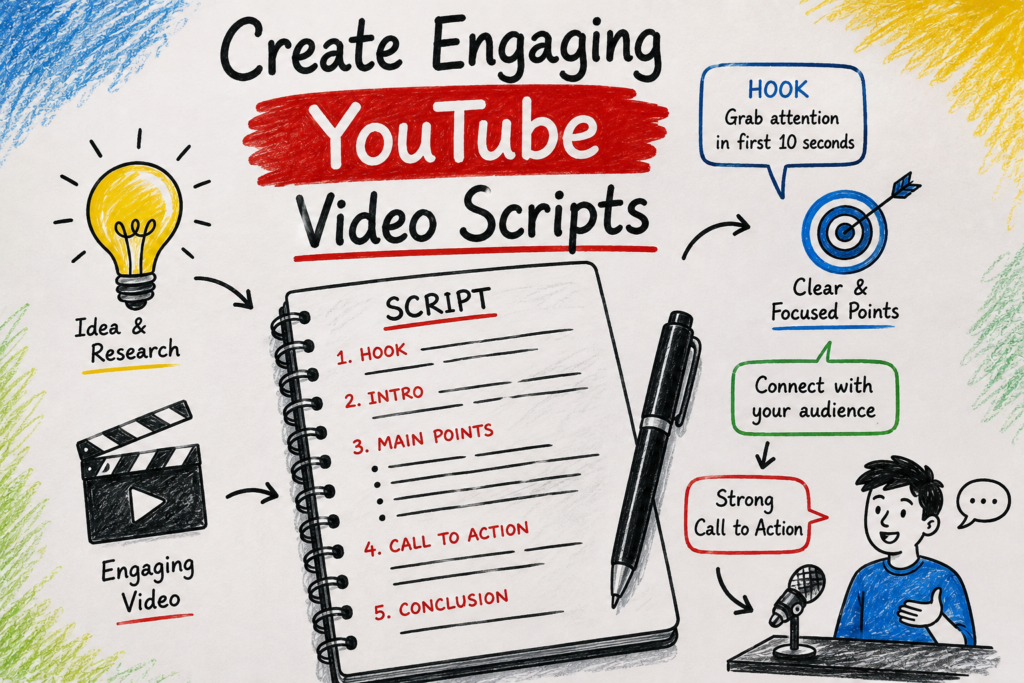
5. Create Engaging YouTube Video Scripts
A good YouTube video needs more than just information—it needs to keep viewers watching. ChatGPT can help you create scripts with strong hooks, smooth transitions, and clear endings.
Best For
- YouTubers
- Educational channels
- Tech reviewers
- Vloggers
- Content creators
Copy & Paste Prompt
Write a YouTube video script about “[Your Topic]”. Start with a powerful hook that grabs attention in the first 10 seconds. Keep the language simple and conversational. Include an introduction, main points, examples, a call-to-action, and an engaging ending. Make the script suitable for a 7–10 minute video.
What You’ll Get
- Attention-grabbing introduction
- Natural storytelling
- Easy-to-follow script
- Better audience engagement
Script Flow
Interesting Hook
↓
Introduce the Topic
↓
Explain Main Points
↓
Give Examples
↓
Strong Call-to-Action
↓
End the Video
Pro Tip
Ask ChatGPT to include questions throughout the script. This makes viewers feel involved and increases watch time.
6. Write Professional Emails in Seconds
Writing emails can be stressful, especially when they need to sound professional. ChatGPT can save time by creating clear, polite, and well-structured emails.
Best For
- Employees
- Business owners
- Students
- Freelancers
- Customer support
Copy & Paste Prompt
Write a professional email about “[Your Topic]”. Keep the tone polite, friendly, and professional. Include a suitable subject line, clear message, and a respectful closing. Make it concise but informative.
Example Uses
- Job application
- Leave request
- Client proposal
- Business inquiry
- Thank-you email
- Follow-up email
What You’ll Get
✔ Professional tone
✔ Better grammar
✔ Clear communication
✔ Ready-to-send email
Prompt Flow
Choose Purpose
↓
Mention Recipient
↓
Explain Key Details
↓
Select Tone
↓
Generate Email
Pro Tip
Always tell ChatGPT who will receive the email. For example:
- Your manager
- A customer
- A teacher
- A company
- A client
The tone will automatically become more appropriate.
7. Create Viral Social Media Captions
Creating fresh captions every day isn’t easy. ChatGPT can generate captions that are engaging, creative, and suitable for different social media platforms.
Best For
- X (Twitter)
Copy & Paste Prompt
Write 10 engaging social media captions about “[Your Topic]”. Keep them short, interesting, and easy to understand. Include emojis only if appropriate, and finish each caption with a strong call-to-action.
Example Topics
- AI tools
- Smartphones
- Fitness
- Travel
- Photography
- Business
What You’ll Get
- Creative captions
- Better engagement
- Fresh content ideas
- Multiple caption options
Caption Flow
Choose Topic
↓
Select Platform
↓
Choose Tone
↓
Add Call-to-Action
↓
Publish Your Post
Pro Tip
Mention the platform in your prompt.
For example:
- “Write an Instagram caption.”
- “Write a LinkedIn post.”
- “Write a tweet for X.”
Each platform has a different writing style, and ChatGPT can adjust accordingly.
Quick Tips for Writing Better ChatGPT Prompts
No matter what you’re asking ChatGPT to do, these simple tips will help you get better results every time.
- Be clear about your goal.
- Give enough background information.
- Mention your target audience.
- Ask for a specific format if needed.
- Keep refining your prompt if the first answer isn’t perfect.
- Don’t hesitate to ask ChatGPT to rewrite or improve its response.
Think of ChatGPT as a helpful assistant. The more details you provide, the more useful the answer will be.
8. Write and Fix Programming Code
Coding can be challenging, especially when you run into errors that are difficult to understand. ChatGPT can explain code, find bugs, suggest improvements, and even write programs from scratch.
Whether you’re learning programming or working on a real project, this prompt can save a lot of time.
Best For
- Beginners learning to code
- Web developers
- App developers
- Computer science students
- Software engineers
Copy & Paste Prompt
Act as an experienced programmer. Write clean, well-commented code for “[Your Task]” using [Programming Language]. Explain each step in simple English. If there are any errors, identify them and provide the corrected version with a clear explanation.
Example
Your Task: Create a responsive login page.
Programming Language: HTML, CSS, and JavaScript.
What You’ll Get
- Clean code
- Error explanations
- Better coding practices
- Easy-to-understand comments
Prompt Flow
Describe Your Project
↓
Choose Programming Language
↓
Ask for Clean Code
↓
Request Error Fixes
↓
Understand the Solution
Pro Tip
If you’re getting an error, copy the complete error message into your prompt. ChatGPT can often explain the problem much faster than searching multiple websites.
9. Plan Your Perfect Trip
Planning a trip takes time. You need to choose destinations, hotels, attractions, restaurants, and transportation. ChatGPT can create a complete travel plan based on your budget and interests.
Best For
- Family vacations
- Solo travel
- Weekend trips
- International holidays
- Business travel
Copy & Paste Prompt
Create a detailed travel itinerary for a [Number]-day trip to [Destination]. My budget is [Budget]. Suggest the best places to visit, local foods to try, transportation options, nearby attractions, estimated daily expenses, and practical travel tips.
Example
Destination: Tokyo
Budget: $1,500
Trip Duration: 5 Days
What You’ll Get
- Daily travel schedule
- Budget planning
- Food recommendations
- Sightseeing ideas
- Travel tips
Prompt Flow
Choose Destination
↓
Set Budget
↓
Select Trip Duration
↓
Mention Interests
↓
Get Complete Itinerary
Pro Tip
Include your interests, such as photography, shopping, adventure, history, or food. This helps ChatGPT personalize your travel plan.
10. Generate Business Ideas and Marketing Plans
Starting a business or growing an existing one requires creativity and planning. ChatGPT can help you generate business ideas, identify target customers, create marketing strategies, and even suggest ways to increase sales.
Best For
- Entrepreneurs
- Startups
- Small business owners
- Freelancers
- Digital marketers
Copy & Paste Prompt
Act as a business consultant. Suggest 10 profitable business ideas based on my skills in [Your Skills]. For each idea, explain the target audience, earning potential, startup cost, marketing strategy, and the first five steps to get started.
What You’ll Get
- Practical business ideas
- Marketing strategies
- Startup roadmap
- Growth suggestions
Prompt Flow
Mention Your Skills
↓
Choose Business Type
↓
Analyze Market
↓
Create Marketing Plan
↓
Start Your Business
Pro Tip
The more information you provide about your skills, experience, and budget, the more personalized the business ideas will be.
Tips to Get Better Results from ChatGPT
Even the best prompts can be improved. Follow these simple tips whenever you use ChatGPT.
- Be specific about what you want.
- Mention your goal clearly.
- Tell ChatGPT who the content is for.
- Ask for examples whenever possible.
- Specify the format, such as a blog post, table, email, or checklist.
- If the first answer isn’t perfect, ask ChatGPT to improve or rewrite it.
- Break large tasks into smaller prompts for more accurate results.
Remember, ChatGPT works best when it has enough context.
Frequently Asked Questions (FAQs)
1. What is a ChatGPT prompt?
A ChatGPT prompt is the instruction or question you give to ChatGPT. A clear and detailed prompt usually produces better and more accurate answers.
2. Why are detailed prompts better?
Detailed prompts provide context, making it easier for ChatGPT to understand exactly what you need. This often results in higher-quality responses.
3. Can beginners use these prompts?
Yes. These prompts are written in a simple way and are suitable for beginners, students, professionals, and anyone interested in using AI more effectively.
4. Can I edit these prompts?
Absolutely. You can replace the topic, audience, language, or other details to match your own needs.
5. Which ChatGPT prompt is the most useful?
It depends on your goal. Bloggers may prefer the blog writing prompt, students may find the learning prompt most helpful, while creators may benefit from the image and video prompts.
6. Do these prompts work with other AI tools?
Many of these prompts can also be adapted for AI tools that generate images, videos, code, or text. You may need to make small adjustments depending on the platform.
7. How can I improve my ChatGPT prompts?
Add more details, explain your goal clearly, specify the format you want, and include any important requirements. The more context you provide, the better the response is likely to be.
Conclusion
Learning how to write effective ChatGPT prompts is one of the easiest ways to get more value from AI. Instead of asking basic questions, you can guide ChatGPT with clear instructions and receive detailed, creative, and useful answers.
The 10 prompts shared in this guide cover many everyday needs, from creating stunning AI images and videos to writing blog posts, solving coding problems, planning trips, and generating business ideas.
They’re designed to save time, improve productivity, and help you achieve better results with less effort.
Don’t be afraid to experiment. Modify these prompts, add your own details, and see how the responses improve. As you practice, you’ll become better at communicating with AI and unlocking its full potential.
If you’re just getting started, save this guide and revisit these prompts whenever you need inspiration. A well-written prompt can turn ChatGPT into a powerful assistant for work, study, creativity, and everyday tasks.